
Versioned releases
Plugin downloads, release notes, and docs are tied to published MisePress builds so site owners can see what changed.
MisePress Recipes gives food creators, restaurants, chefs, and web designers a complete recipe publishing system for WordPress — with smart search, recipe archives, favourites, shopping lists, schema, nutrition fields, builder blocks, and polished frontend experiences without plugin chaos.
Built for serious food websites, modern WordPress builders, and client-ready projects. Product page last reviewed May 23, 2026.
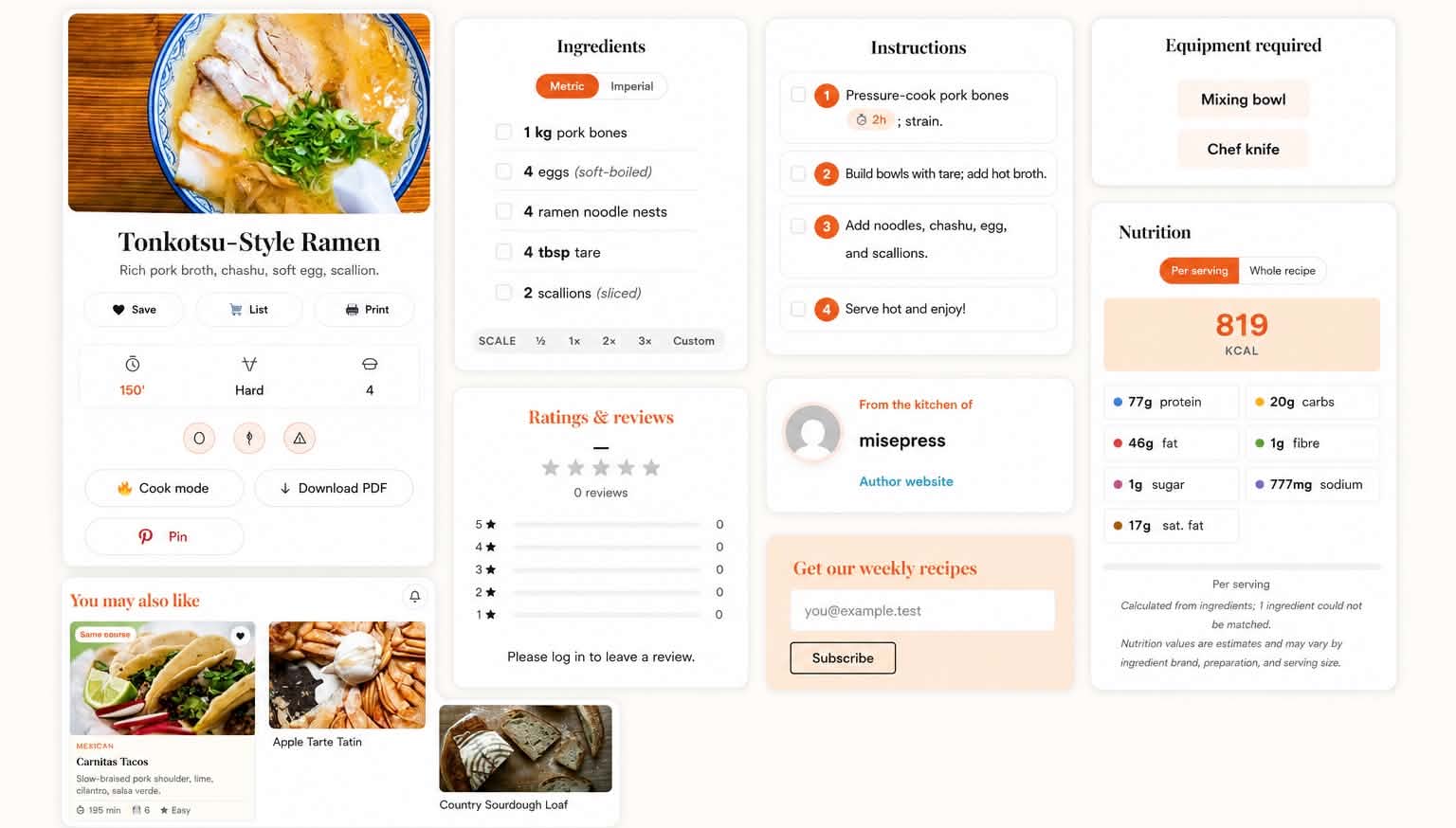
The product story starts with the reader-facing recipe: ingredients, instructions, equipment, nutrition and follow-on actions all visible in one calm layout.
The demo shows the WordPress recipe plugin in context: a recipe archive, single recipe pages, favourites, shopping-list flows, search behaviour, and Pro Smart Feed on a public food site.
MisePress Recipes keeps its product story public: release notes, docs, demo pages, builder support, privacy-minded analytics, and dashboard support all sit around the same plugin.
Plugin downloads, release notes, and docs are tied to published MisePress builds so site owners can see what changed.
The recipe system works with standard WordPress themes. Bricks and Automatic.css support improve the workflow, but they are not required.
Bricks elements, shortcodes, recipe-field outputs, and ACSS inheritance help designers keep recipe sites on-brand.
Search and recipe analytics are built for content planning, with optional Hub aggregation kept opt-in.
MisePress focuses on recipe and search activity rather than personal visitor profiles.
Paid accounts get support from the MisePress dashboard, with docs and changelog available publicly.
Most food websites end up relying on separate plugins for custom post types, filters, search, favourites, shopping lists, analytics, and email integrations. The result is poor UX, inconsistent design, and a maintenance nightmare. MisePress Recipes brings the food-content experience into one focused system.
The best recipe websites are not all the same, but they need the same foundations: structured recipes, useful search, trust signals, and a reason for readers to return.
A WordPress recipe plugin for searchable archives, nutrition labels, schema, saved recipes, timers, and content ideas from real reader searches.
Turn signature dishes, seasonal menus, chef stories, and lead capture into a recipe experience that feels more premium than a basic blog card.
Publish polished recipes, collect interested readers, and give clients a clear way to save, cook, and come back to your food content.
Build recipe websites for clients without assembling custom post types, search, schema, favourites, nutrition, analytics, and builder styling from separate plugins.
Recipe management, smart archives, reader tools, schema, nutrition fields, builder-friendly styling, and Pro growth features — all in one WordPress plugin.
A proper recipe content type with structured fields, taxonomies for cuisines, ingredients, diets, difficulty and time, and a polished single-recipe layout.
Filterable, mobile-friendly archives with active filter chips, grid/list display, sorting, and shareable filter state — so visitors find what they want fast.
Typo-tolerant, diacritic-insensitive search with autocomplete. Searching ‘pitsa’ still finds ‘pizza’ — and the results page uses the same logic as the suggestions.
Visitors save recipes to their account, with a dedicated favourites page and shortcode. Built for repeat visits and engagement.
Readers add ingredients to a shopping list and turn recipe inspiration into actual cooking. Works for both logged-in users and guests.
A lightweight discovery panel for saved-recipe ideas, shopping-list matches, seasonal inspiration, trending content, followed topics, and personalized recommendations.
Connect recipe workflows to email growth tools instead of treating reader actions as disconnected forms.
Search analytics, top queries, zero-result terms, schema health checks, and content opportunities for planning the recipes readers already want.
Move recipe libraries with JSON, JSON-LD, Paprika-style payloads, supported recipe-plugin exports, URL import, and recipe CSV import/export.
Free Bricks elements, Gutenberg blocks, shortcodes, and Automatic.css/CSS variable styling keep recipe data available inside normal WordPress design workflows.
Drop archives, search bars, favourites, shopping lists, recipe cards, sliders and category grids anywhere with shortcodes. Pro surfaces like Smart Feed use the same placement model when enabled.
A recipe card plugin can publish ingredients and instructions. MisePress Recipes is for sites where discovery, trust, repeat visits, and design control matter just as much as the recipe itself.
MisePress Recipes handles the full recipe journey: archives, search, single recipe pages, favourites, shopping lists, timers, schema, nutrition fields, builder blocks, and Pro growth tools.
Free covers smart search, fuzzy search and basic filters. Pro adds Smart Feed, smart collections, advanced ranking, advanced filters and recommendation shortcodes.
Nutrition labels and EU-14 allergen badges sit inside the recipe workflow, where readers make decisions, rather than being hidden in disconnected fields.
Search analytics surface top queries, empty searches, and trends so you can see what readers want before you plan the next recipe.
If you build sites for restaurants, chefs, food bloggers, or hospitality brands, MisePress Recipes gives you the food-content logic without forcing you to rebuild it from scratch. Use it as the foundation for premium client websites — and keep full design control inside WordPress.
The Bricks and Automatic.css story matters, but it is not a screenshot on this page yet. Framing it as a capability keeps the page honest while still giving designers the context they need.
MisePress Recipes keeps the page focused on one product while still covering the important long-tail use cases: nutrition, schema, Bricks, and large recipe archives.
Start here if you want the broad product story: recipe publishing, smart search, schema, nutrition, saved recipes, shopping lists, analytics, and builder-friendly WordPress design.
Use MisePress Recipes when calories, macros, serving size, and ingredient-based nutrition need to be visible on the recipe page without a spreadsheet workflow.
Native Bricks elements, shortcodes, recipe CPT queries, and Automatic.css inheritance make it practical for designers building custom food websites.
Recipe JSON-LD, ratings, nutrition, cook times, ingredients, and multilingual schema support are part of the publishing flow.
Typo-tolerant search, filters, autocomplete, related recipes, and analytics help bigger recipe libraries stay useful as they grow.
These focused pages keep the product page specific while giving searchers useful context for common decisions around WordPress recipe plugins.
For teams who want a recipe plugin focused on the whole food website: archives, search, saved recipes, shopping lists, analytics, schema, and builder workflows.
For food publishers who want polished recipe pages plus stronger discovery, engagement, and content-planning signals.
For sites where a recipe card is not enough and the archive, search, schema, nutrition, and reader actions all need to work together.
Plan a recipe move around fields, URLs, nutrition, schema, archive filters, and the reader actions that make the new site better.
Try the live recipe demo at demo.misepress.com, then come back here for pricing, docs, and account setup.
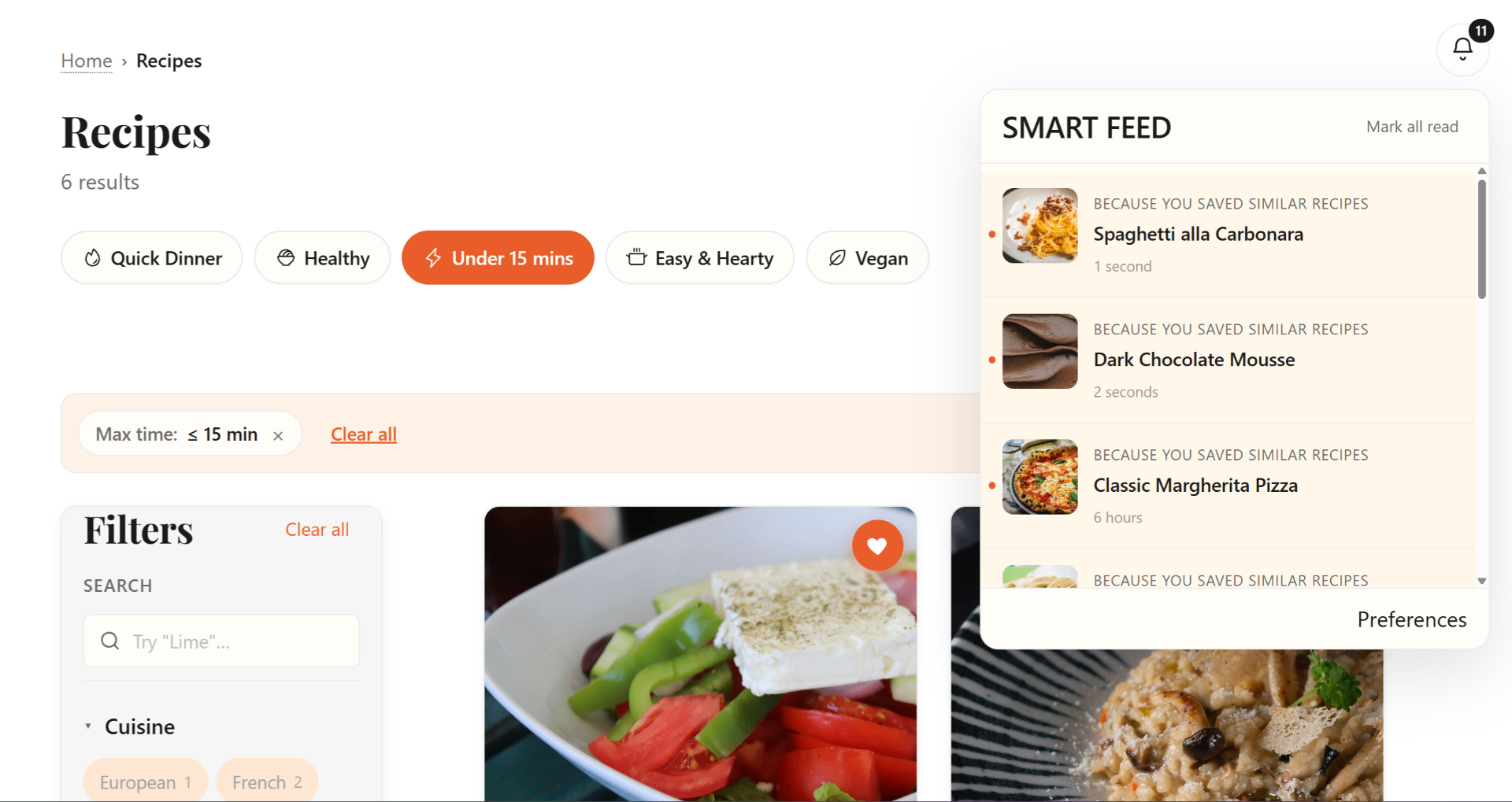
The archive screenshot shows the plugin in browsing mode: filters, smart search and Smart Feed all close to the recipe grid.
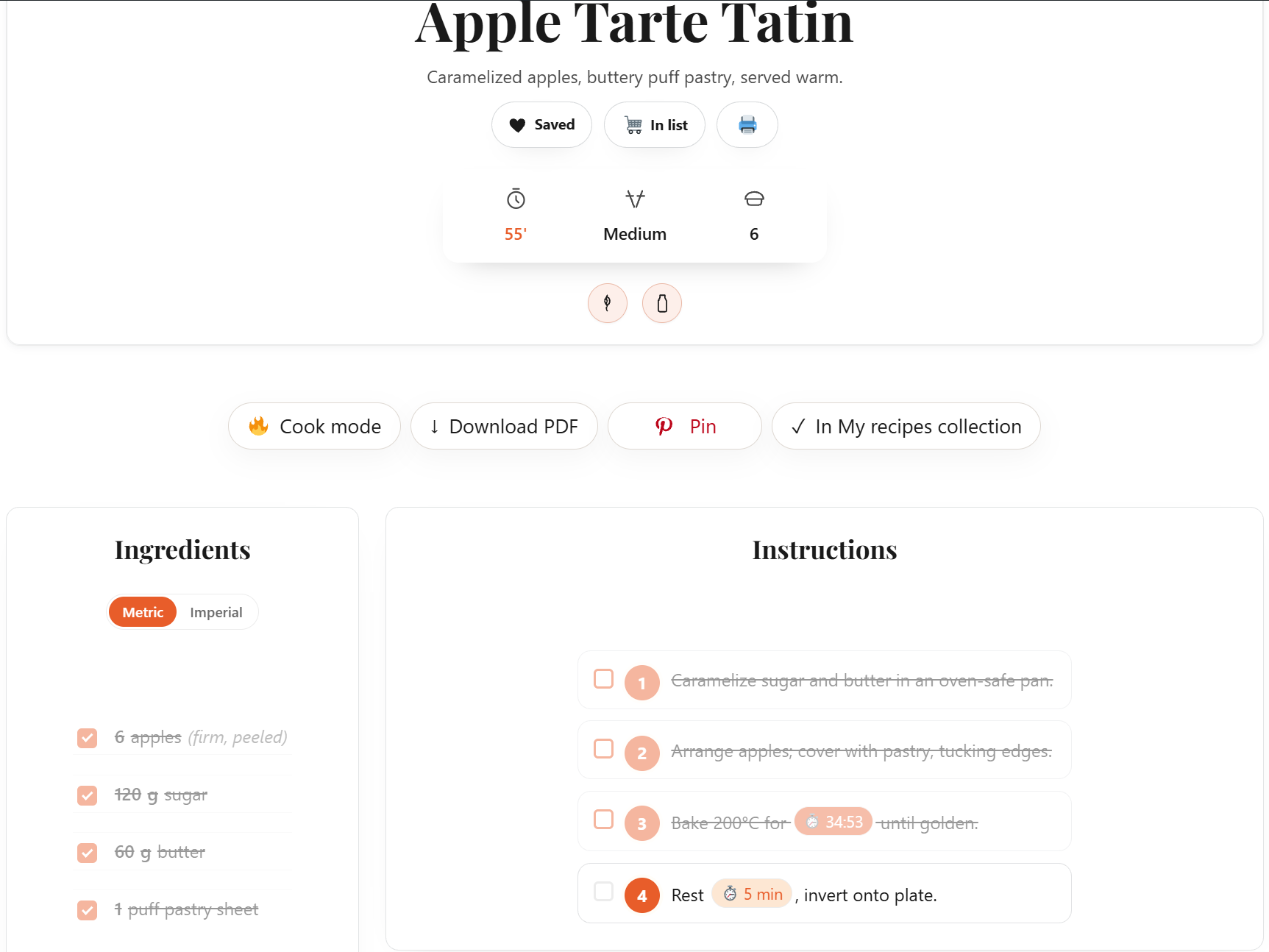
Timed cooking steps sit inside the recipe, so readers can cook without leaving the page.
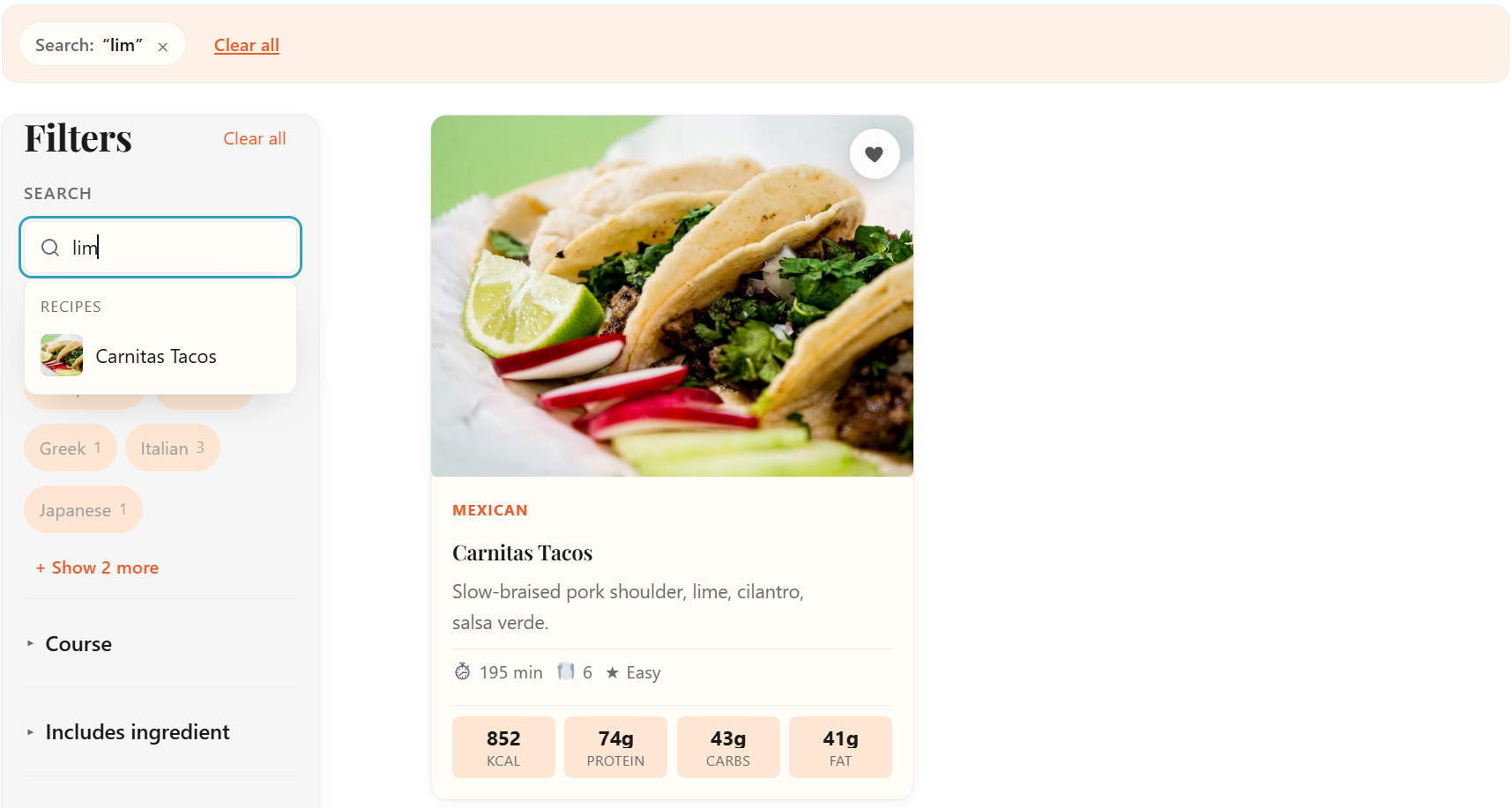
Autocomplete and related recipes keep discovery moving before the visitor reaches a dead end.
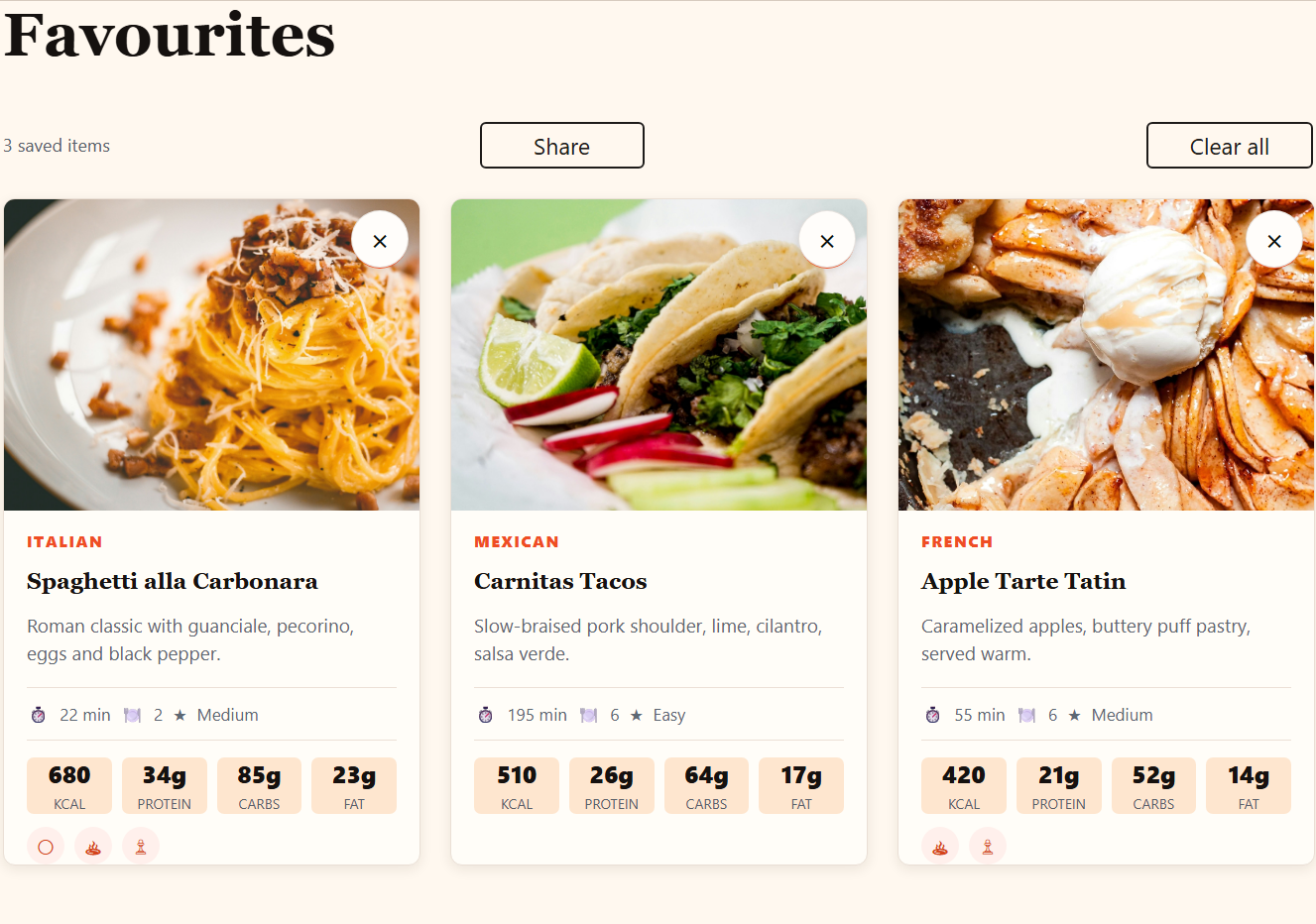
Saved recipes give returning readers a personal recipe shelf across devices.

Shopping lists turn saved recipes into a practical next step for logged-in readers or guests.
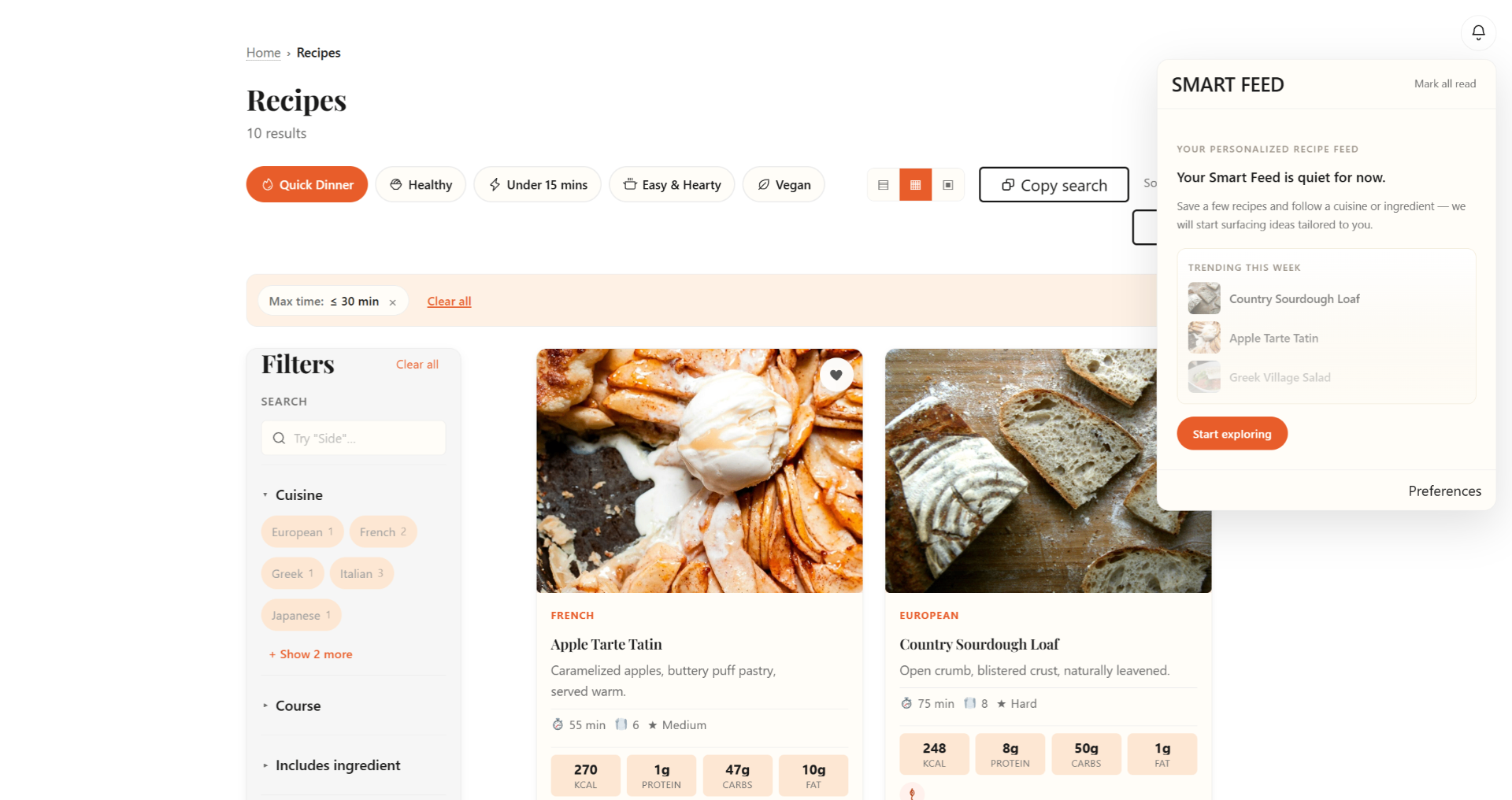
Smart Feed brings saved, seasonal, personalized and related recipe prompts back into the browsing flow.
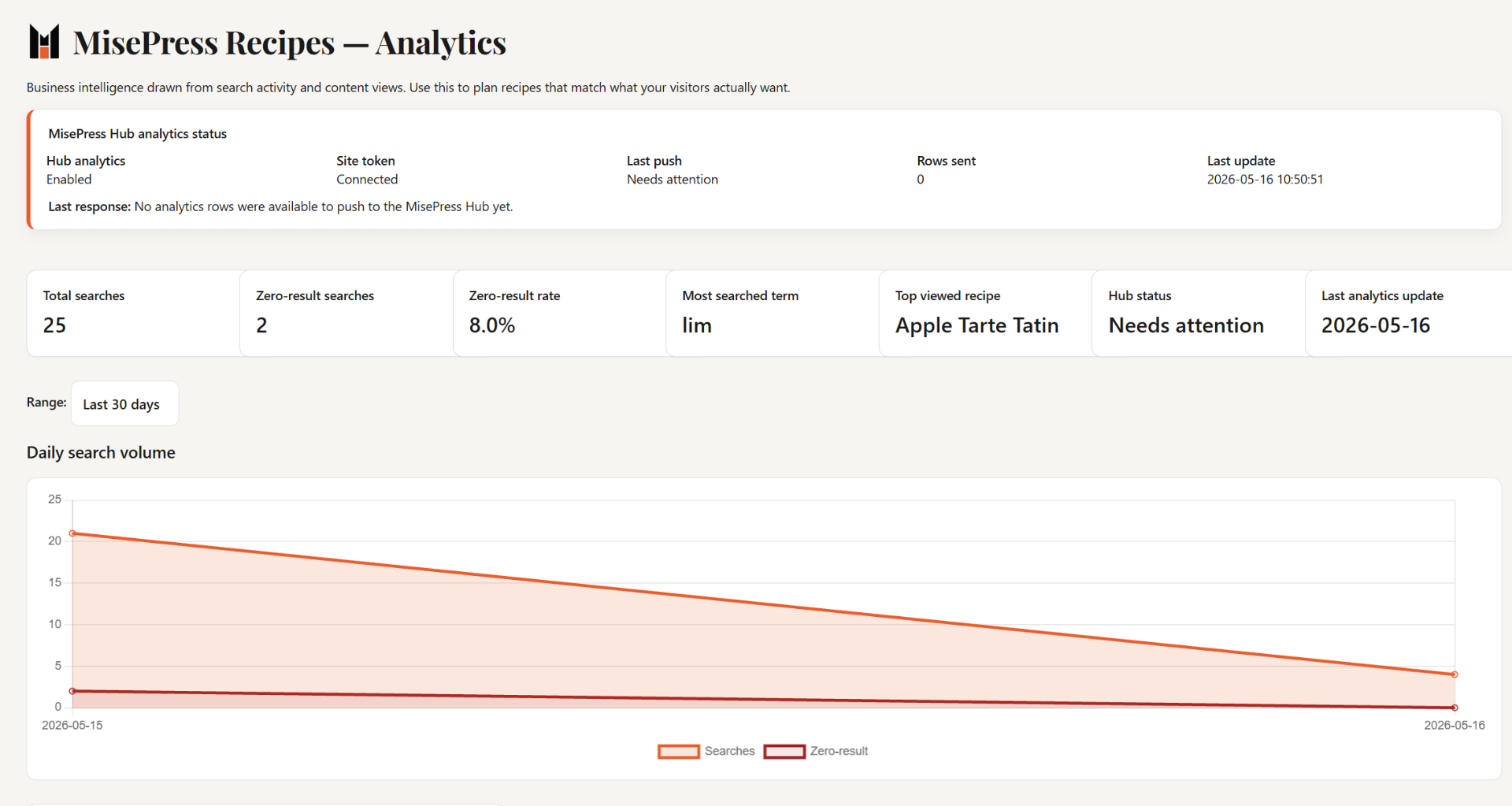
Search analytics reveal top queries, empty searches and the recipes worth publishing next.

Recipe pages can connect reader interest to the site's email workflow when Pro integrations are enabled.

Free Bricks elements appear directly in the builder panel; Smart Feed placements are available when Smart Feed is enabled.
MisePress Recipes helps you understand what visitors want by tracking searches, zero-result terms, recipe views, and content opportunities. Instead of guessing what to publish next, you can see what your audience is already looking for.
Privacy: MisePress Pro analytics focuses on recipe and search activity, not personal visitor profiles.
MisePress Recipes Pro includes email integrations for recipe sites, creators, and food businesses, so reader intent can move from the recipe page into the tools you already use.
Free keeps the core recipe workflow focused. Pro is where list-growth and email integration features belong.
Email integrations are framed as a Pro growth layer, not a generic newsletter form pasted below a recipe.
Smart Feed adds a lightweight discovery layer to your recipe website — saved-recipe ideas, shopping-list matches, seasonal inspiration, trending recipes, and followed-topic updates. Site owners control which sources are enabled; visitors only see toggles for the ones you allow.
Free covers the core recipe site. Every Pro tier includes the same advanced Pro features; the only thing that changes is how many sites you can activate.